WCAG Techniques for Fixed Layout
General guidance
This section provides techniques for producing more accessible fixed layout EPUB content that aligns with WCAG 2.2 success criteria. This note only addresses specific techniques applicable to fixed layout EPUB content. For EPUB accessibility techniques in general, refer to EPUB Accessibility Techniques 1.2 [[epub-a11y-tech-12]].
Helpful resources
Content access
This section covers techniques for content access specific to fixed layout content. For techniques applicable to EPUB content in general, see EPUB Accessibility Techniques 1.2 Section 3.2.
Ensure meaningful order of content across spreads and within pages
For general guidance on meaningful order across the publication, refer to EPUB Accessibility Techniques 1.2 Section 3.2.1. The following techniques deal specifically with issues related to producing fixed layout content.
The page position problem
For complex visual designs, the position of objects on the page is not a reliable indicator of their reading order. In the following example, information on the author is placed ahead of the main heading for the page. Figure 2 demonstrates how the programmatic reading order has to be designed so that the content is read logically. The main heading is first, followed by the author information and then the text.
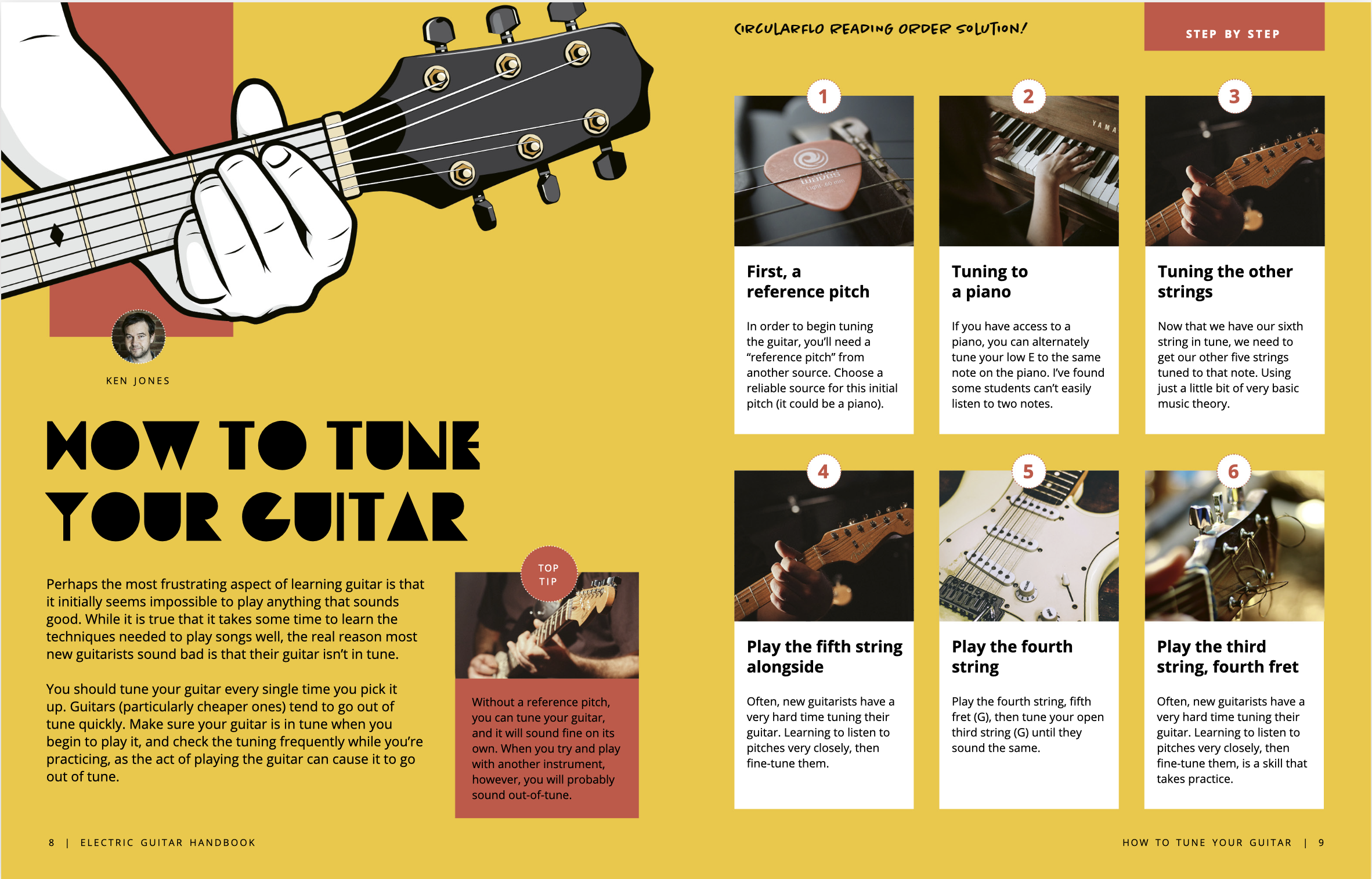
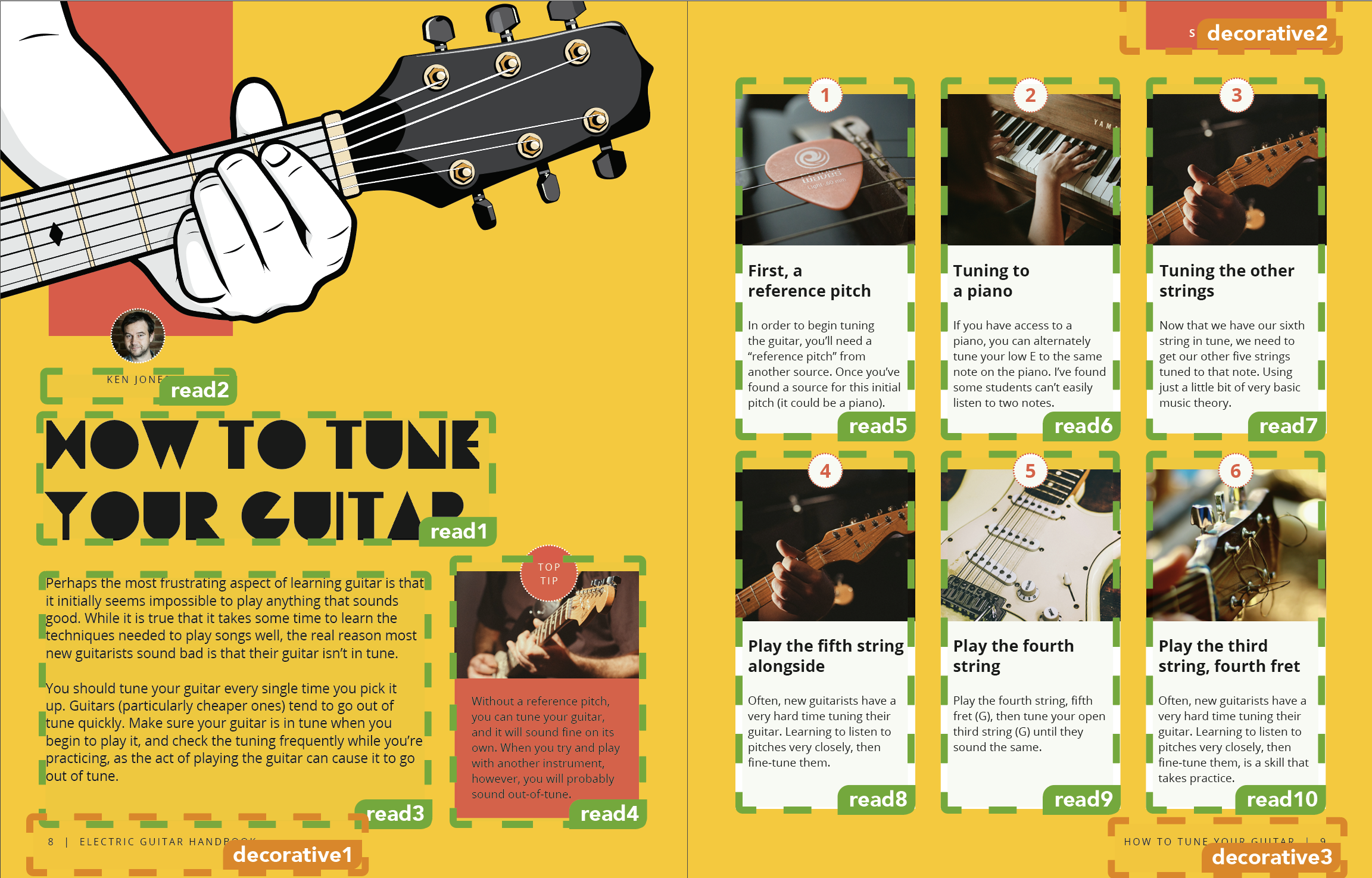
In a multi-column document, the linear presentation of the content flows from the top of a column to the bottom of the column, then to the top of the next column.
For further guidance, you can also refer to this example from "Understanding WCAG Success Criteria 1.3.2: Meaningful Sequence".
Checking the reading order
Fixed layout EPUBs with complex visual designs can face issues with the generated output of the document not following the logical reading order. Due to how page elements may be ordered or arranged, it is important to ensure the document order follows the logical reading order.
The recommended best practice solution is to adjust the order of the elements in the HTML page to follow the logical reading order, and to preserve the visual design using CSS. Determining which CSS properties to use will depend on the design and layout, however there are some techniques that can be reliably used for specific situations.
The CSS property z-index can be used to arrange layers of content on the page without altering the programmatic order of the page. For more information, review MDN's Understanding z-index.
Removing items from the reading order
There may be cases when text appears on the page but is unnecessary, duplicated or otherwise confusing for it to be added to the reading order. e.g. page numbers, section or chapter headings which are already part of the publication's structure or text used for visual effects. There may also be non-text content that appears on the page but only serves as decoration, such as ornamental images or layout elements.
There are multiple ways to hide content from users visually, in the accessibility tree, or both. Choosing a method depends on the reason for removing the item from the reading order. The accessibility tree is defined in the Core Accessibility API Mappings 1.1 [[core-aam]] as "a tree of accessibility objects that represents the structure of the user interface (UI)" and it is the structure that assistive technologies use to navigate and comprehend the content of the page.
The best technique for removing items from the programmatic reading order, or the order used by assistive technologies while keeping the content visible on the page is to use the ARIA attribute aria-hidden="true".
CSS techniques such as display: none or visibility: hidden can be used to hide content from both the visual presentation and the accessibility tree. display: none removes the element from the layout entirely, while visibility: hidden keeps the element in the layout but makes it invisible, which can impact the visual design of the page.
For content that should be hidden from the visual presentation but still accessible to assistive technologies, techniques such as a .sr-only class should be used. This technique visually hides the content by placing it off the screen while keeping it in the accessibility tree.
Reading order across spreads
Content in fixed layout EPUBs is often presented in the form of spreads, a concept taken from print books where two facing pages can be displayed side by side. It is essential that EPUB creators manage the reading order when spreads are used.
As each page in a fixed layout EPUB is its own content document, when two pages are present in the viewport they are separate documents with their own reading orders and do not interact. It is recommended to never have content that relies on moving non-linearly through a spread, as moving between content documents using assistive technologies is typically linear, and spreads may not always be displayed as intended due to reading system constraints or user settings, particularly on small screens.
If the reading order must cross between pages in a spread, techniques such as providing links between content sections are one way to allow users of assistive technologies the ability to navigate content according to the reading order. EPUB creators may also consider consolidating the pages in a spread into a single content document.
Provide multiple ways to access content
Titles and Headings
Techniques for titles and headings in fixed layout EPUB content closely follow the recommendations made in EPUB Accessibility Techniques 1.2 Section 3.3 Titles and Headings.
XHTML page titles
The title of each XHTML page may be displayed to users of assistive technologies. As such it should be a meaningful description of the page contents or a page number.
Structural hierarchy across documents
Fixed layout EPUB content should maintain a consistent structural hierarchy throughout the entire publication. EPUB creators will need to be conscious that due to the structure of fixed layout content documents, this means that a page may not have a top-level heading, or that heading levels need to be tracked over multiple content documents.
Descriptions
As much as possible, we recommend making the text on the page its own layer, using technologies such as SVG and CSS to achieve the desired styling and placement, while also making the text more accessible to the user. When text is rasterized into the image, it is recommended to use the alternative text and image description recommendations described in this section.
Image descriptions for SVG (Scaleable Vector Graphics)
SVG provides two elements for describing images:
title- the equivalent of the HTMLaltattribute; it is used to provide alternative text for an entire SVG image and individual components within it.desc- used to provide an extended description for the entire SVG image and individual components within it.
When a publication is made of fixed-layout SVG pages these two elements can be used to describe the content. Note
that ARIA attributes (role and aria-describedby) are added to improve
support in assistive technologies as SVG is still not well supported.
The title and desc SVG elements can also be used to annotate components
of a larger image.
The one problem with using these elements to annotate SVG images is that their content is typically only made available to users of assistive technologies.
A more advanced approach would be to add a link or button to view the description using script or animations (e.g., open the description like a pop-out). EPUB reading system support for such approaches is likely to be limited and testing is encouraged.
Image descriptions for HTML
When an image is embedded in an HTML fixed layout page, there are more options available for including accessible descriptions. As with SVG fixed layouts, the primary consideration is once again the limitation of having only limited screen space in which to include the description.
For this reason, descriptions are typically hidden from view using a variety of HTML, ARIA and CSS techniques. Descriptions can be hidden, clipped, made opaque, layered under an image, etc. The knowledge base page on hidden content delves into these possibilities in more detail.
Support for scripting in XHTML content documents in EPUB is generally much better than is available for SVG, so there are more reliable techniques that can be used to make the descriptions viewable by a wider range of users. Clicking or tapping on an image can be used to show its description, for example. The Voyage of Life sample EPUB contains an experimental example of this technique.
Unlike reflowable publications, the CSS background-image property can be used with
fixed layouts to set the background image for a page. It is best to limit this practice to
backgrounds that are purely presentational as much as possible, however, as it complicates the
ability to provide a description that any user will be able to reach (i.e., it often involves
hiding the description only for assistive technologies).
Language
Techniques for language accessibility are covered in EPUB Accessibility Techniques 1.2 Section 3.5.
Text
Techniques for text accessibility are covered in EPUB Accessibility Techniques 1.2 Section 3.6.
Accessible alternatives
Techniques for providing accessible alternatives are covered in EPUB Accessibility Techniques 1.2 Section 3.7.
It should also be noted that reflowable EPUB content is an accessible alternative to fixed layout, and should be explored before deciding to use fixed layout or another file format.
EPUB Techniques for Fixed Layout
Synchronized text-audio playback
Techniques for synchronized text-audio playback in EPUB content can be found in EPUB Accessibility Techniques 1.2 Section 4.2.
Footnotes and Endnotes
Techniques for footnotes and endnotes in EPUB content can be found in EPUB Accessibility Techniques 1.2 Section 4.2.3 (Identifying skippable structures).
Interactivity
While Fixed Layout publications provide a reliable canvas for visual design, adding interactive elements requires careful consideration of accessibility. Interactivity in EPUB files typically relies on scripting technologies such as JavaScript. However, many reading systems restrict or completely disable scripting due to security policies and platform-level constraints. Consequently, authors should evaluate whether interactive functionality is essential to the publication's learning goals or if a non-scripted static alternative can achieve the same educational outcome.
When interactive features are included, creators must follow established web standards to ensure content remains operable and understandable for users relying on assistive technologies. Standard practices—such as providing full keyboard navigation, implementing accessible focus management, and using dynamic state notifications—should be applied directly within the HTML markup. For standard patterns and techniques on making interactive components accessible, authors can consult the W3C ARIA Authoring Practices Guide (APG), the WAI-ARIA 1.2 Specification [[wai-aria]], and the WCAG 2.2 Understanding Documents [[wcag2]].
Distribution techniques for Fixed Layout
Techniques for distribution in EPUB content can be found in EPUB Accessibility Techniques 1.2 Section 5.