Technique F109:Failure of Success Criterion 3.3.8 and 3.3.9 due to preventing password or code re-entry in the same format
About this Technique
This technique relates to:
- 3.3.8 Accessible Authentication (Minimum) (Failure)
- 3.3.9 Accessible Authentication (Enhanced) (Failure)
This failure applies to all technologies that require authentication.
Failure techniques show examples of how content can fail particular WCAG success criteria. However, content may still satisfy those criteria if it includes equivalent/alternative content or functionality that does meet the normative requirements. See About WCAG Techniques.
Description
Requiring users to authenticate by entering a password or code in a different format from which it was originally created is a failure to meet Success Criteria 3.3.8 Accessible Authentication (Minimum) and 3.3.9 Accessible Authentication (Enhanced) (unless alternative authentication methods are available). The string to be entered could include a password, verification code, or any string of characters the user has to remember or record to authenticate.
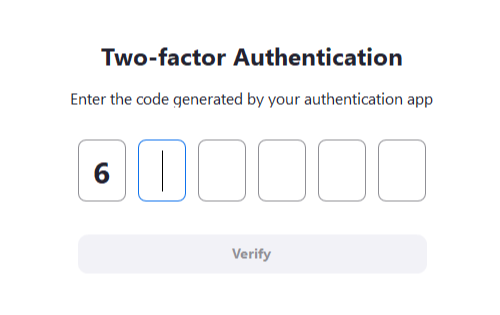
Figure 1. A time-based one-time password (TOTP) challenge that requires users to enter each digit of the 6-digit code into separate input fields – trying to paste the entire code only fills in one digit in the first input.
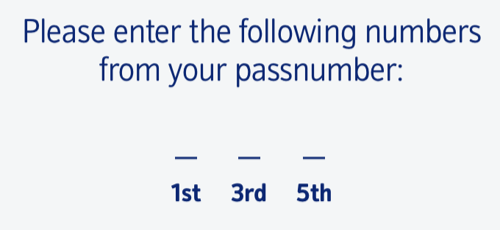
Figure 2. A passnumber entry form, asking users to work out and enter specific digits (such as "the first, third, and fifth digit") of their passnumber.
If a user is required to enter individual characters across multiple fields in a way that prevents pasting the password in a single action, it prevents use of a password manager or pasting from local copy of the password. This means users cannot avoid transcription, resulting in a cognitive function test. This applies irrespective of whether users are required to enter all characters in the string, or just a subset.
Examples
These examples would prevent a user from entering a password or code in the same format in which it was originally created:
- A fieldset that prompts a user to "Enter the 2nd, 6th and last characters of your password", with separate input fields for each character.
- A fieldset that prompts a user to enter each digit of a verification code in a separate input (unless the user can paste the entire code in the first input, and the remaining inputs are populated automatically).
- A password input fieldset composed of
<select>elements that requires a user to select each character of a fixed-length password from individual dropdown fields.
Tests
Procedure
For each form field which accepts password or code entry:
- Check that the input field allows the user to fill in the entire password or code in the format in which it was originally created.
- If the previous step is not true, check if there is an alternative authentication method present that satisfies Success Criteria 3.3.8 Accessible Authentication (Minimum) or 3.3.9 Accessible Authentication (Enhanced) (such as an authentication method that does not rely on a cognitive function test).
Expected Results
- If both checks #1 and #2 are false, then this failure condition applies and content fails the success criterion.