In principle, Japanese and Chinese texts don't use space characters. However, sometimes it is necessary to increase or decrease gaps between characters to improve readability. This article looks at ways of using CSS to add gaps between certain types of text, to reduce gaps between punctuation marks, and to manage paragraph-initial spacing. It does not look at the changes in spacing between characters that are introduced during full justification.
Rather than simply reproducing the spec itself here, we provide task-oriented guidance to help content authors achieve key techniques.
Note that some of the technologies described here are still under development, and browser adoption is only partial at best. In what follows we will describe what you should do when the CSS specification is properly implemented by browsers, and also describe what currently works and doesn't work.
We will work with the following CSS properties. For links to the CSS specification see endlinks.
letter-spacing: normal | <length-percentage>
text-autospace:normal |
        no-autospace |
        [ ideograph-alpha || ideograph-numeric || punctuation ]
        || [ insert | replace ]
        | auto
text-spacing-trim: auto |
        [ normal | trim-both | trim-start | space-first | trim-all | space-all]
text-indent: [ <length-percentage> ] && hanging? && each-line?
hanging-punctuation: none | [ first || [ force-end | allow-end ] || last ]
Inter-character letter-spacing
Unlike justification, which fits text within a fixed space, letter-spacing (also known as tracking) adds regular amounts of space between letters, and the resulting length is a by-product of that.
Space should not be added between an alphanumeric string and closing punctuation, commas, etc.
Letter-spacing is commonly used to achieve a visual balance between items with large and small numbers of characters, such as expanding the width of short headings, running heads, and captions. When expanding text, equal amounts of space are added between the character frames.
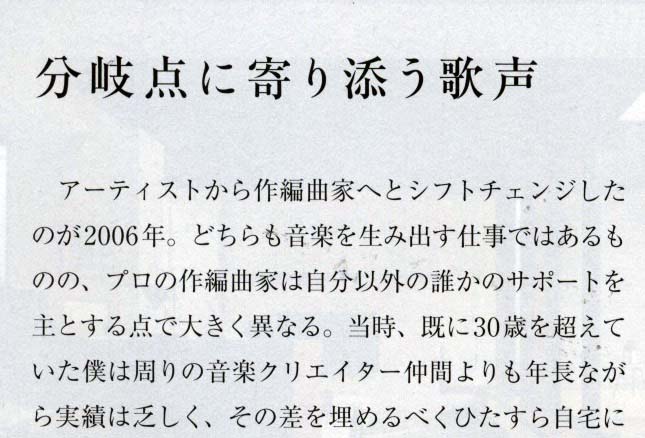
Examples of headings where letter spacing has been applied..
Solid set text is normally best for readability, however in large print sizes, such as for magazine headings, it may be desirable to reduce the distance between certain characters. This is typically done by reducing the distance between adjacent letter faces.
How to do it. To create inter-character spacing in HTML use the CSS letter-spacing property, with the appropriate value, which can be negative or positive.
Output in your browser (only the bottom two lines use letter-spacing):
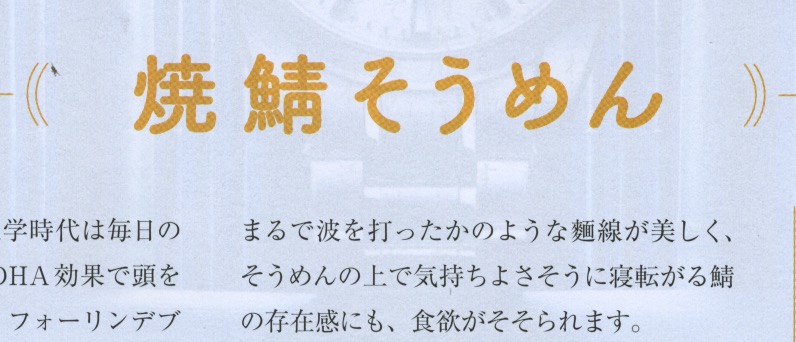
焼鯖そうめん
焼鯖そうめん
焼鯖そうめん
Choose a font:
Does it work? Browsers using Blink, Gecko, and WebKit engines all support the use of letter-spacing as described here.
Spacing around alphabetic or numeric phrases
When a run of alphanumeric text appears in a line of Japanese or Chinese, it is typically set off from the surrounding han/kanji/kana letters by a small gap in order to improve readability.
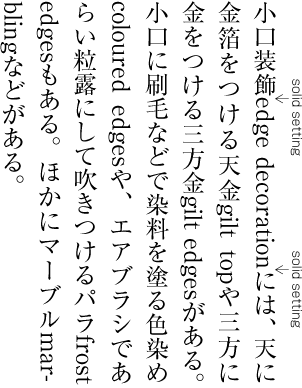
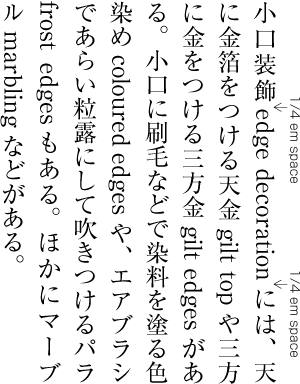
A Japanese paragraph where text-spacing has (right) and has not (left) been applied. (source)
The amount of spacing can vary. The Chinese Layout Requirements document suggests up to a ¼em space. The Japanese Layout Requirements document suggests a ¼em space, but sometimes other spaces may be appropriate, such as ⅙em. The amount of space introduced by a space character is too large, and it is much more convenient to insert the correctly sized gap through styling.
Such spacing is not needed when the phrase is followed or preceded by punctuation that already has built in space. It also doesn't appear at the line start/end.
How to do it. The CSS specification expects that, by default, the browser should automatically insert a gap between runs of ideographs or kana characters and runs of alphanumeric text (ie. the normal value). The size of the gap is dependent on the browser, however the CSS spec suggests 1/8 of the width of an ideographic character, which is on the smaller side of the suggested lengths. Unfortunately, no browser currently inserts a gap by default at this time.
To achieve this result using styling, you should, in principle, be able to use the text-autospace CSS property in your style sheet. Do not use space characters!
The values of the text-autospace property can be used to tweak the results as follows.
normal
This produces the same behavior as the combination ideograph-alpha ideograph-numeric (see below). That is, it creates a gap between runs of ideographs and runs of non-ideographic letters or numerals, but only inserts a gap where an ordinary space has not been used.
At the time of writing, Blink and Gecko browsers produce gaps around alphanumeric phrases. WebKit browsers create a small gap before the alphanumeric text, but not after.
ideograph-alpha and ideograph-numeric
These values are usually used together, however they are split so that you could choose which items receive the extra space if you wish. Used together, they create gaps around both alpha and numeric text.
At the time of writing, Blink browsers don't support the use of these values. Gecko browsers support these values when used individually, but not when used together. WebKit browsers create a small gap before the alphanumeric text, but not after. This applies whether or not both values are used together.
Currently, it is safer to use the normal value, rather than these individual keywords.
replace
There are 2 ways in which CSS can add gaps. If the text already contains gaps produced using ordinary space characters the CSS will, by default, only add gaps where there are no spaces. If, on the other hand, you want to reduce the width of any space-based gaps and apply even spacing throughout, use the replace value. text-autospace:ideograph-alpha ideograph-numeric replace; removes any space character glyphs from the displayed text (without changing the characters in memory) and replaces them with a standard width gap; it also creates gaps where the space character hadn't been used.
None of the three major browser engines currently support the use of replace. In fact, it's worse. If you add the replace keyword, Gecko and WebKit browsers will no longer apply the gaps they would produce without it. Note also that the replace keyword cannot be used with normal, which seems to be a shame. (A feature request was raised about this.)
no-autospace
To remove all synthesised gaps (but leave any manually-typed space characters in place) use text-autospace:no-autospace.
auto
Gives over control of autospace behaviour to the browser, assuming that the browser has implemented special rules that differ from the normal case. Note that if you use this value your text may look different from browser to browser.
Ideally, when browsers support the CSS, and because replace doesn't work with the normal keyword, you will probably want to use the following most of the time: text-autospace: ideograph-alpha ideograph-numeric replace;
However, while the replace value stops the other values working, for now you may want to go with: text-autospace: normal;
Does it work? The text-autospace property is still not interoperably implemented on major browser engines, and what partial implementations exist are problematic. No browser adds the autospace by default. That said, adding a text-autospace rule to your CSS style sheet now doesn't do any harm, and may improve the rendered text as implementations improve. (For now, however, drop the replace keyword, since it scuppers what spacing is applied.)
The following demo has three paragraphs. The first has no styling. The second is styled only with normal. And the third line adds the replace keyword. Space characters surround the term "gilt top". Shading is just to help visual examination.
Output in your browser (only the bottom two paragraphs use text-autospace):
小口装飾edge decorationには、天に金箔をつける天金 gilt top や、三方に金をつける3方gilt edgesがある。
小口装飾edge decorationには、天に金箔をつける天金 gilt top や、三方に金をつける3方gilt edgesがある。
小口装飾edge decorationには、天に金箔をつける天金 gilt top や、三方に金をつける3方gilt edgesがある。
Choose a font:
Spacing around punctuation
Punctuation such as full stop, comma, parentheses, etc. normally has built-in space associated with it because the ink takes up only a part of the em square, which is the same size as that used for ideographic or kana characters. However, in some situations, the blank space associated with such punctuation characters is not appropriate.
When text is arranged on a strict grid pattern, none of this space removal applies.
The following sections look at how to manage gaps around punctuation.
When certain multiple punctuation marks appear side by side, the cumulative blank parts of each character can add up and create an inappropriately large gap. Such large gaps should be eliminated, to improve readability. Here we will use brackets to illustrate this, but this applies to a number of character combinations. See fig_character_frame.
Brackets before collapse (top) and after (bottom).
fig_text_space_adjacent shows the gap collapsed in real text. It shouldn't be necessary to use halfwidth characters for this; you should use normal characters and the application should remove the appropriate amount of space automatically.
Space has been removed on the right to make the text more readable.
Not all spaces are collapsed. While space is collapsed for colons and semicolons in horizontal text, it is not collapsed for those punctuation marks in vertical text. Space is not collapsed for question marks and exclamation marks whether they occur in horizontal or vertical contexts. For a list of what characters have their width reduced, when, and how, see the CSS specification.
How to do it. The CSS Text specification proposes a way to remove superfluous gaps between punctuation marks using the text-spacing-trim CSS property.
You can indicate to the browser that you want to do this using text-spacing-trim:normal, but in fact, any of the following additional values for that property remove space in punctuation clusters: trim-both, space-first, trim-start, and trim-all. The particular value you should choose depends on how you want to handle space at the start of a paragraph, which is discussed below.
:root { text-spacing-trim: normal; }
Output in your browser (only the bottom line uses text-spacing-trim):
先代がいて、「お前はま」。
先代がいて、「お前はま」。
Choose a font:
If, for some reason, you want to prevent the space collapsing you can use text-spacing-trim:space-all.
Does it work? As of the time of writing, browser support for text-spacing-trim is limited.
Blink browsers support gap reduction using the values mentioned above, but also reduce the gap by default — no styling needed.
However, WebKit and Gecko browsers do not reduce space between punctuation marks.
Line-initial punctuation
This section is concerned with punctuation marks that normally include built-in space on the left, such as the bracket 「. We'll use that for the following examples, although this applies also to other punctuation marks.
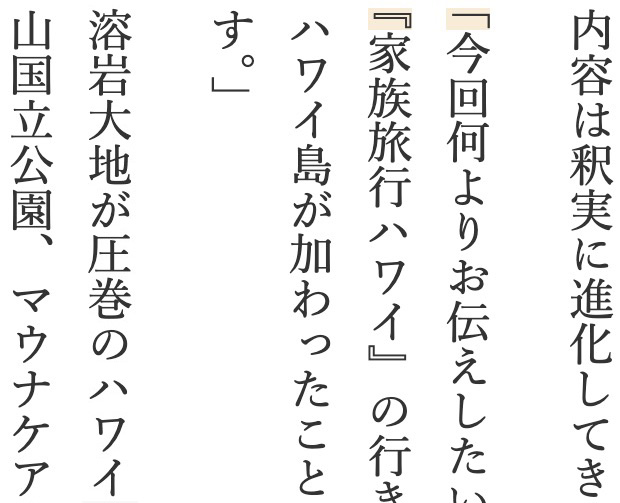
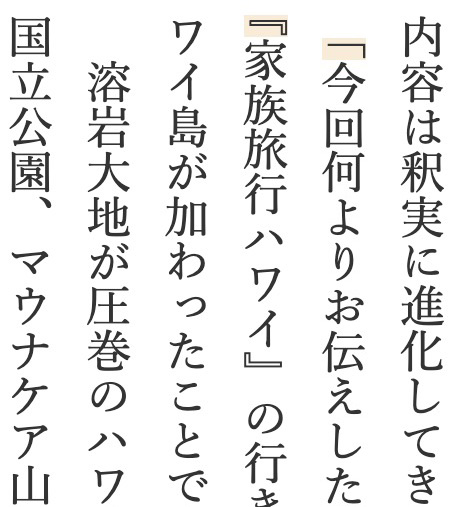
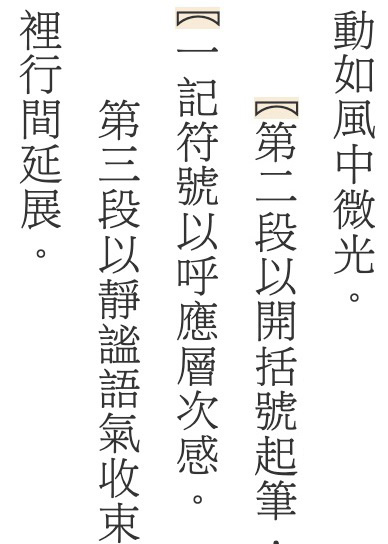
When a punctuation mark like this appears at the beginning of a line, there are a number of possibilities. These decisions will typically be influenced by whether or not a paragraph is preceded by a blank line, or whether the first line of the paragraph is indented.
At the beginning of a paragraph, we may want to see:
a half-width bracket, with or without indentation
an indentation of a half-space before a bracket, but a full space before other characters
a fullwidth bracket, ie. with a half space before it, with or without indentation
A bracket that is NOT at the start of the paragraph but that wraps to the beginning of a line would usually have no space before it, but it is also possible to preserve that space by forcing use of a fullwidth character.
The CSS specification recommends the use of text-spacing-trim for this. Unfortunately, text-spacing-trim is not supported by Gecko or WebKit browsers. There is, however, limited support with Blink browsers, such as Chrome and Edge.
The text-spacing-trim property has a number of possible values. Each property affects the width of punctuation marks at the start and end of a line. fig_text_spacing_trim_values provides an overview. Brackets that are the first character in a paragraph may or may not be preceded by indentation (set using a different property).
For each value in fig_text_spacing_trim_values, three lines are shown containing brackets. The first line shows whether a paragraph-initial bracket is fullwidth or halfwidth. The left side of the second line shows what an inline bracket would look like when wrapped to a new line. To the right of the second line, a halfwidth graphic indicates that a closing bracket at line end can be reduced to fit. The third line shows the expected width of a paragraph-final bracket when there is adequate space after it to show a fullwidth glyph.
A paragraph-initial bracket is fullwidth. An inline bracket that wraps to a line start is fullwidth. A closing bracket at line end can be reduced to fit. A closing bracket at the end of a paragraph with space available is fullwidth.
A paragraph-initial bracket is halfwidth. An inline bracket that wraps to a line start is halfwidth. A closing bracket at line end can be reduced to fit. A closing bracket at the end of a paragraph with space available is fullwidth.
A paragraph-initial bracket is fullwidth. An inline bracket that wraps to a line start is halfwidth. A closing bracket at line end can be reduced to fit. A closing bracket at the end of a paragraph with space available is fullwidth.
A paragraph-initial bracket is fullwidth.
An inline bracket that wraps to a line start is fullwidth.
A closing bracket at line end is fullwidth.
Values of the property text-spacing-trim, and their effects on brackets at the start and end of a line.
Font dependencies
We will see below that some of the behaviour we are looking for exists in (for the time being) Blink engine browsers, such as Chrome, Edge, Brave, etc. However, it is important to note that success depends on the font used.
The CSS specification indicates that browsers may rely upon OpenType features in order to trim relevant glyphs.
The table that follows shows which macOS and Noto fonts support the trimming of leading space, and which don't (in Blink browsers).
Japanese
Simplified Chinese
Traditional Chinese
✅
❌
✅
❌
✅
❌
Hiragino Mincho Pro Noto Serif CJK JP Toppan Bunkyu Mincho YuMincho Hiragino Kaku Gothic Pro Hiragino Sans Osaka Toppan Bunkyu Gothic Noto Sans CJK JP YuGothic Arial Unicode MS Hiragino Maru Gothic Pro Tsukushi A Round Gothic Tsukushi B Round Gothic Toppan Bunkyu Midashi Gothic YuKyokasho YuKyokasho Yoko
Noto Serif CJK TC Noto Sans CJK TC PingFang HK PingFang TC PingFang MO Hiragino Sans TC
Apple LiSung LiSong Pro Songti TC Nom Na Tong Apple LiGothic Heiti TC Lantinghei TC LiHei Pro Yuanti TC BiaukaiTC BiaukaiHK Kaiti TC Xingkai TC Baoli TC Hannotate TC HanziPen TC Libian TC Wawati TC Weibei TC Yuppy TC
The above results were derived from text displayed in horizontal lines. Some fonts (such as PingFang TC) support the expected behavour in horizontal text, but not in vertically set text. You should also be careful to note whether the font supports glyphs for the bracket you want to use: for example, the Hiragino Sans TC font doesn't appear to support the 〖 bracket (although it does support the 【 bracket) — if you use that bracket and that font you may see unexpected failures.
Scenario #1: No space, no indent
When paragraphs are separated by blank lines, the first line of the paragraph is often not indented. Then, when a paragraph begins with an opening bracket, it is common to remove the halfwidth space before it.
To do this, you should be able to use text-spacing-trim with the value trim-start or trim-both. Those values should remove leading space from the bracket, both at the start of a paragraph and when a bracket inside the paragraph is wrapped to the beginning of a new line.
The difference between trim-start and trim-both is that the former trims only the opening bracket, whereas the latter also trims a closing bracket at the end of a line.
:root { text-spacing-trim: trim-start; }
p { margin-block: 1em; }
Output in your browser. (Adjust the line length so that both opening brackets appear at the start of the line.)
漢字漢字漢字漢字漢字漢字漢字。
「漢字漢字漢字漢字漢字漢字漢字漢漢字。」
漢字漢字漢字漢字漢『漢字漢字漢字漢字漢字』漢字漢字。
漢字漢字漢字漢字漢字漢字,漢字漢字。
Choose a font:
Adjust line length:
Does it work? The trim-start value is supported by Blink browsers, but trim-both is not. Neither value is supported by Gecko or WebKit browsers.
Scenario #2: Hanging punctuation
A common arrangement for Japanese text is to remove the gaps between paragraphs, and start each paragraph with a one em indent. When an opening bracket appears at the beginning of the first line in the paragraph, it occupies the right-hand (or lower) half of that indentation. This can be visually analysed as a fullwidth character replacing the indent, or as the halfwidth bracket ‘hanging’ to the left of/above the actual line start.
For this arrangement, the CSS specification suggests the rules shown in the box below. The text-indent property applies the indent across all paragraphs. The text-spacing-trim line removes the leading space from the bracket. Then the hanging-punctuation line moves the bracket into the indent space.
Output in your browser. (Adjust the line length so that both opening brackets appear at the start of the line.)
漢字漢字漢字漢字漢字漢字漢字。
「漢字漢字漢字漢字漢字漢字漢字漢漢字。」
漢字漢字漢字漢字『漢字漢字漢字漢字漢字』漢字漢字。
漢字漢字漢字漢字漢字漢字,漢字漢字。
Choose a font:
Adjust line length:
Does it work? Unfortunately, this approach cannot currently be produced in Blink or Gecko browsers, since they don't support the hanging-punctuation property.
WebKit browsers do support hanging-punctuation:first, and the bracket at the beginning of the paragraph looks as expected. However, WebKit browsers don't remove the half space before a bracket that is inside a paragraph but is wrapped to the beginning of a line.
Scenario #3: Non-hanging indent
The figure just above shows Chinese paragraphs with the first line indented. In the case of Chinese, the typical indent is 2em. The leading space of the bracket is removed, but unlike the previous Japanese example, the bracket doesn't hang in the indent space.
The following CSS should achieve this effect. The text-indent property, once again, applies the indent across all paragraphs (but 2 em gaps this time). The text-spacing-trim line then removes the leading space from the bracket.
p {
  margin: 0;
  text-indent: 2em;
  text-spacing-trim: trim-start;
  }
Output in your browser. (Adjust the line length so that both opening brackets appear at the start of the line.)
漢字漢字漢字漢字漢字漢字漢字。
「漢字漢字漢字漢字漢字漢字漢字漢字漢字。」
漢字漢字漢字漢字『漢字漢字漢字漢字漢字』漢字漢字。
漢字漢字漢字漢字漢字漢字,漢字漢字。
Choose a font:
Adjust line length:
Does it work? In the test above we use the trim-start value, simply because that works in Blink browsers. Ideally, you would be able to also use trim-both.
This approach works in Blink browsers, but in Gecko and WebKit browsers the brackets are not reduced in size — this produces 2½ spaces before the paragraph-initial bracket. The latter two engines, of course, also fail to remove the leading space from inline brackets that are wrapped to the beginning of a new line.
Scenario #4: Space-first layout
A lot of existing content, especially in ePub documents, was created before CSS addressed the problems of paragraph-initial punctuation. Common practice, as a result, involves the use of an ideographic space character before most initial paragraph lines, but the substitution of a fullwidth bracket glyph instead where needed. This gives the half space before the bracket that we saw in the hanging example above. It looks identical, but it is achieved by using characters, rather than styling.
The space-first value of text-spacing-trim was designed to facilitate this arrangement. We still want inline brackets that are wrapped to a new line to be halfwidth, but we want to ensure that the paragraph-initial bracket remains fullwidth (unlike when using trim-start). There is no need for the text-indent property or the hanging-punctuation property.
p {
  margin-block: 0;
  text-spacing-trim: space-first;
  }
Output in your browser. (Adjust the line length so that both opening brackets appear at the start of the line.)
漢字漢字漢字漢字漢字漢字漢字。
「漢字漢字漢字漢字漢字漢字漢字漢漢字。」
漢字漢字漢字漢字『漢字漢字漢字漢字漢字』漢字漢字。
漢字漢字漢字漢字漢字漢字,漢字漢字。
Choose a font:
Adjust line length:
Does it work? Blink browsers support this value. Gecko and WebKit browsers are fine with the paragraph-initial bracket (because no styling is applied), but haven't implemented the value, which means that a bracket wrapped to a new line will be fullwidth.
Note that, in addition to keeping fullwidth glyphs at line start and end, space-all also prohibits the collapse of space between adjacent, inline punctuation (see punctuation_sequences).
Line-final punctuation
When we consider line-final punctuation we want to know whether a closing bracket or other punctuation with trailing space will have that space removed automatically when there is only enough space at the line end for a halfwidth character. If there is a halfwidth character gap but the punctuation remains fullwidth, it will be wrapped to the following line, taking with it the previous character (because closing brackets should not occure at the start of a line).
All of the text-spacing-trim values automatically reduce the width of a closing bracket at the end of a line, except for the space-all value.




 .......................................

 .......................................
 Blink
Blink Gecko
Gecko WebKit