1. Introduction
This section is non-normative.
Accurately measuring performance characteristics of web applications is an important aspect of making web applications faster. While JavaScript-based mechanisms, such as the one described in [JSMEASURE], can provide comprehensive instrumentation for user latency measurements within an application, in many cases, they are unable to provide a complete or detailed end-to-end latency picture. For example, the following JavaScript shows a naive attempt to measure the time it takes to fully load a page:
< html > < head > < script type = "text/javascript" > var start= new Date(). getTime(); function onLoad() { var now= new Date(). getTime(); var latency= now- start; alert( "page loading time: " + latency); } </ script > </ head > < body onload = "onLoad()" > <!- Main page body goes from here. --> </ body > </ html >
The above script calculates the time it takes to load the page after the first bit of JavaScript in the head is executed, but it does not give any information about the time it takes to get the page from the server, or the initialization lifecycle of the page.
This specification defines the PerformanceNavigationTiming
interface which participates in the [PERFORMANCE-TIMELINE-2] to store
and retrieve high resolution performance metric data related to the
navigation of a document. As the PerformanceNavigationTiming
interface uses [HR-TIME], all time values are measured with respect
to the time origin of the entry’s
relevant settings object.
For example, if we know that the response end occurs 100ms after the
start of navigation, the PerformanceNavigationTiming data could
look like so:
startTime:           0.000  // start time of the navigation request
responseEnd:       100.000  // high resolution time of last received byte
The following script shows how a developer can use the
PerformanceNavigationTiming interface to obtain accurate timing
data related to the navigation of the document:
< script > function showNavigationDetails() { // Get the first entry const [ entry] = performance. getEntriesByType( "navigation" ); // Show it in a nice table in the developer console console. table( entry. toJSON()); } </ script > < body onload = "showNavigationDetails()" >
2. Terminology
The construction "a Foo object", where Foo is
actually an interface, is sometimes used instead of the more accurate
"an object implementing the interface Foo".
The term current document refers to the document associated with the Window object’s newest Document object.
Throughout this work, all time values are measured in milliseconds since the start of navigation of the document. For example, the start of navigation of the document occurs at time 0. The term current time refers to the number of milliseconds since the start of navigation of the document until the current moment in time. This definition of time is based on [HR-TIME] specification.
3. Navigation Timing
3.1. Relation to the PerformanceEntry interface
PerformanceNavigationTiming interface extends the following
attributes of PerformanceEntry interface:
- The
entryTypegetter step is to return theDOMString"navigation". - The
startTimegetter step is to return aDOMHighResTimeStampwith a time value of 0. - The
durationgetter step is to return aDOMHighResTimeStampequal to the difference betweenloadEventEndand this’sstartTime.
A user agent implementing PerformanceNavigationTiming would need
to include "navigation" in
supportedEntryTypes
for Window
contexts. This allows developers to detect support for Navigation
Timing.
3.2. Relation to the PerformanceResourceTiming interface
PerformanceNavigationTiming interface extends the following
attributes of the PerformanceResourceTiming
interface:
-
The
redirectStartgetter steps are to perform the following steps:- If this’s redirect count is 0, return 0.
- Otherwise return this’s
redirectStart.
-
The
redirectEndgetter steps are to perform the following steps:- If this’s redirect count is 0, return 0.
- Otherwise return this’s
redirectEnd.
Though `redirectStart` and `redirectEnd` are exposed in
PerformanceResourceTiming, they have a different meaning in Navigation Timing, where they return zero for navigations with cross-origin redirects. -
The
workerStartgetter steps are to perform the following steps:- Let workerTiming be this’s service worker timing.
- If workerTiming is null, then return this’s prototype’s `workerStart`.
- Return workerTiming’s start time.
Though `workerStart` is exposed in
PerformanceResourceTiming, it has a different meaning in Navigation Timing, as unlike subresources, a navigation may trigger the activation or running of a service worker. In the context of Navigation Timing, `workerStart` returns the timestamp measured just before the worker has been activated or started. See [service-workers] for a precise definition. -
The
fetchStartgetter steps are to perform the following steps:- Let workerTiming be this’s service worker timing.
- If workerTiming is null, then return this’s prototype’s `fetchStart`.
- Return workerTiming’s fetch event dispatch time.
When a service worker is used as part of the navigation, The `fetchStart` overload holds a different meaning than the meaning in
PerformanceResourceTiming. It returns the timestamp measured right before theFetchEventis dispatched for the service worker. The time difference between `workerStart` and `fetchStart` in the document’s navigation timing entry can be used to determine roughly how long it took for the worker to be initialized or activated. See [service-workers] for a precise definition.
Only the current document resource is included in the
performance timeline; there is only one
PerformanceNavigationTiming object in the performance timeline.
3.3. The PerformanceNavigationTiming interface
requestStart,
responseStart and
responseEnd attributes.
[Exposed =Window ]interface :PerformanceNavigationTiming PerformanceResourceTiming {readonly attribute DOMHighResTimeStamp unloadEventStart ;readonly attribute DOMHighResTimeStamp unloadEventEnd ;readonly attribute DOMHighResTimeStamp domInteractive ;readonly attribute DOMHighResTimeStamp domContentLoadedEventStart ;readonly attribute DOMHighResTimeStamp domContentLoadedEventEnd ;readonly attribute DOMHighResTimeStamp domComplete ;readonly attribute DOMHighResTimeStamp loadEventStart ;readonly attribute DOMHighResTimeStamp loadEventEnd ;readonly attribute NavigationTimingType type ;readonly attribute unsigned short redirectCount ;readonly attribute DOMHighResTimeStamp criticalCHRestart ;readonly attribute NotRestoredReasons ?notRestoredReasons ;readonly attribute PerformanceTimingConfidence confidence ; [Default ]object (); };toJSON
A PerformanceNavigationTiming has an associated
document load timing info document load timing.
A PerformanceNavigationTiming has an associated
document unload timing info previous document unload timing.
A PerformanceNavigationTiming has an associated
number redirect count.
A PerformanceNavigationTiming has an associated
NavigationTimingType navigation type.
A PerformanceNavigationTiming has an associated
DOMHighResTimeStamp `Critical-CH` restart time.
A PerformanceNavigationTiming has an associated
NotRestoredReasons not restored reasons.
A PerformanceNavigationTiming has an associated
PerformanceTimingConfidence confidence value.
A PerformanceNavigationTiming has an associated real number
randomized trigger rate
which is implementation-defined.
A PerformanceNavigationTiming has an associated PerformanceTimingConfidenceValue
underlying confidence value
which is implementation-defined.
A PerformanceNavigationTiming has an associated null or service worker timing info
service worker timing.
The unloadEventStart getter steps are to return this’s
previous document unload timing’s unload event start time.
If the previous document and the current document have the same origin, this timestamp is measured immediately before the user agent starts the unload event of the previous document. If there is no previous document or the previous document has a different origin than the current document, this attribute will return zero.
The unloadEventEnd getter steps are to return this’s
previous document unload timing’s
unload event end time.
If the previous document and the current document have the same origin, this timestamp is measured immediately after the user agent handles the unload event of the previous document. If there is no previous document or the previous document has a different origin than the current document, this attribute will return zero.
The domInteractive getter steps are to return
this’s document load timing’s DOM interactive time.
This timestamp is measured before the user agent sets the current document readiness to "interactive".
The domContentLoadedEventStart getter steps are to return this’s
document load timing’s
DOM content loaded event start time.
This timestamp is measured before the user agent dispatches the DOMContentLoaded event.
The domContentLoadedEventEnd getter steps are to return
this’s document load timing’s
DOM content loaded event end time.
This timestamp is measured after the user agent completes handling of the DOMContentLoaded event.
The domComplete getter steps are to return
this’s document load timing’s DOM complete time.
This timestamp is measured before the user agent sets the current document readiness to "complete". See document readiness for a precise definition.
The loadEventStart getter steps are to return
this’s document load timing’s load event start time.
This timestamp is measured before the user agent dispatches the load event for the document.
The loadEventEnd getter steps are to return
this’s document load timing’s load event end time.
This timestamp is measured after the user agent completes handling the load event for the document.
The type getter steps are to run the this’s navigation type.
Client-side redirects, such as those using the Refresh pragma
directive, are not considered HTTP redirects by this spec. In those
cases, the type
attribute SHOULD return appropriate value, such as
reload if reloading the
current page, or navigate if
navigating to a new URL.
The redirectCount getter steps are to return this’s
redirect count.
The criticalCHRestart getter steps are to return this’s
`Critical-CH` restart time.
If criticalCHRestart is not 0 it will be before all other timestamps except for navigationStart, unloadEventStart, and unloadEventEnd. This is because it marks the moment the redirection part of the navigation was restarted.
The notRestoredReasons getter steps are to return this’s
not restored reasons.
The confidence getter steps are to run these steps:
- If this’s document load timing’s DOM interactive time is 0, return null.
- If this’s confidence value is not null, return it.
- Let confidence be a new
PerformanceTimingConfidenceobject created in this’s relevant settings object’s relevant realm. - Set confidence’s
randomizedTriggerRateto this’s randomized trigger rate. -
Set confidence’s
valueas determined by the following algorithm:- Let p be confidence’s
randomizedTriggerRate. - Let underlying be this’s underlying confidence value, a
PerformanceTimingConfidenceValue. - Let r be a real number drawn uniformly at random from the interval [0, 1).
- If r > or equal p, return underlying.
- Otherwise:
- Let p be confidence’s
- Return confidence.
These values should be set once, and not change for the lifetime of this.
This section is intended to help RUM providers and developers interpret
confidence. Since the randomized trigger rate can vary across records,
per-record weighting is needed to recover unbiased aggregates. The procedure
below illustrates how weighting based on value
can be applied before computing summary statistics.
To compute debiased means for both high and low:
-
For each record:
- Let p be the record’s
randomizedTriggerRate. - Let c be the record’s
value. - Let R be 1 when c is
high, otherwise 0. -
Compute per-record weight w based on c:
- For estimating the high mean: w
= (R - (p / 2)) / (1 - p). - For estimating the low mean: w
= ((1 - R) - (p / 2)) / (1 - p).
- For estimating the high mean: w
- Let weighted_duration =
duration* w.
- Let p be the record’s
- Let total_weighted_duration be the sum of weighted_duration values across all records.
- Let sum_weights be the sum of w values across all records.
- Let debiased_mean = total_weighted_duration / sum_weights, provided sum_weights is not near zero.
To compute debiased percentiles for both high and low:
- Follow the same steps as computing the debiased mean to compute a per-record weight w.
- Let sum_weights be the sum of w values across all records.
- Let sorted_records be all records sorted by
durationin ascending order. - For a desired percentile (0-100), compute q
= percentile / 100.0 -
Walk sorted_records and for each record:
- Compute cumulative weight cw per-record: cw
= sum_{i: duration_i <= duration_j} w_i. - Compute debiased cumulative distribution function per-record: cdf
= cw / sum_weights
- Compute cumulative weight cw per-record: cw
- Find the first index idx with cdf >= q.
-
Compute interpolation fraction:
- Let lower_cdf be cdf for sorted_records[idx-1]
- Let upper_cdf be cdf for sorted_records[idx]
- if lower_cdf = upper_cdf, return
durationfor sorted_records[idx]. - Otherwise:
The toJSON() method runs the default toJSON steps for this.
3.3.1. The NavigationTimingType enum
enum {NavigationTimingType ,"navigate" ,"reload" };"back_forward"
The values are defined as follows:
- navigate
- Navigation where the history handling behavior is set to "default" or "replace".
- reload
- Navigation where the navigable was reloaded.
- back_forward
- Navigation that’s applied from history.
The format of the above enumeration value is inconsistent with the WebIDL recommendation for formatting of enumeration values. Unfortunately, we are unable to change it due to backwards compatibility issues with shipped implementations. [WebIDL]
3.3.2. The PerformanceTimingConfidence interface
[Exposed =Window ]interface {PerformanceTimingConfidence readonly attribute double randomizedTriggerRate ;readonly attribute PerformanceTimingConfidenceValue value ;object (); };toJSON
-
randomizedTriggerRate, of type double, readonly -
This attribute must return a real number the interval [0, 1), indicating how often noise is applied when exposing the confidence
value. -
value, of type PerformanceTimingConfidenceValue, readonly -
This attribute must return a
PerformanceTimingConfidenceValue. - toJSON()
-
This method runs the default toJSON steps for this.
3.3.3. The PerformanceTimingConfidenceValue enum
enum {PerformanceTimingConfidenceValue ,"high" };"low"
The values are defined as follows:
- high
- The user agent considers the navigation metrics to be representative on the current user’s device.
- low
- The navigation metrics may not be representative of the current user’s device. The user agent may consider the state of the machine, or user configuration.
When determining the underlying confidence value, user agents MUST only base their decision on transient runtime conditions, such as user agent startup, temporarily high CPU usage, temporary memory pressure, or other short-lived considerations.
User agents MUST NOT base the underlying confidence value on permanent device or profile characteristics. Examples of prohibited factors include the amount of physical RAM on the device, the number of CPU cores, the number of installed extensions, or other static environment settings.
Confidence is intended to reflect runtime variability rather than system capabilities.
4. Process
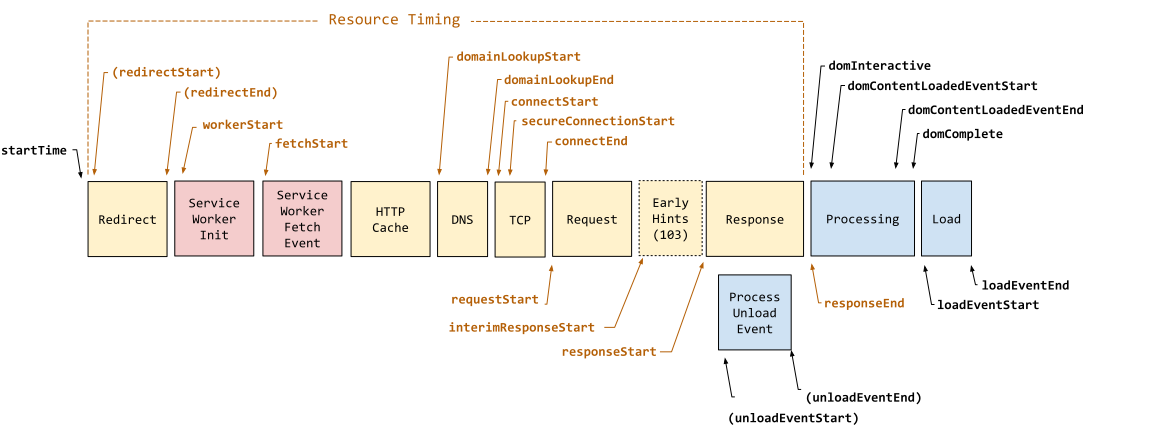
4.1. Processing Model
PerformanceNavigationTiming interface. Attributes in
parenthesis indicate that they may not be available for navigations
involving documents from different origins.
5. Creating a navigation timing entry
Each document has an associated navigation timing entry, initially unset.
To create the navigation timing entry for Document document,
given a fetch timing info fetchTiming, a number redirectCount, a
NavigationTimingType navigationType, a null or service worker timing info serviceWorkerTiming,
a DOMString cacheMode, a DOMHighResTimeStamp criticalCHRestart, and a response body info bodyInfo, do the following:
- Let global be document’s relevant global object.
- Let navigationTimingEntry be a new
PerformanceNavigationTimingobject in global’s realm. - Setup the resource
timing entry for navigationTimingEntry given "
navigation", document’sURL, fetchTiming, cacheMode, and bodyInfo. - Set navigationTimingEntry’s document load timing to document’s load timing info
- Set navigationTimingEntry’s previous document unload timing to document’s previous document unload timing.
- Set navigationTimingEntry’s redirect count to redirectCount.
- Set navigationTimingEntry’s navigation type to navigationType.
- Set navigationTimingEntry’s service worker timing to serviceWorkerTiming.
- Set document’s navigation timing entry to navigationTimingEntry.
- Set navigationTimingEntry’s `Critical-CH` restart time to criticalCHRestart.
- Set navigationTimingEntry’s not restored reasons to the result of creating a NotRestoredReasons object given document’s not restored reasons.
- add navigationTimingEntry to global’s performance entry buffer.
To queue the navigation timing entry for Document document,
queue document’s
navigation timing entry.
6. Privacy Considerations
This section is non-normative.
6.1. Information disclosure
There is the potential for disclosing an end-user’s browsing and activity history by using carefully crafted timing attacks. For instance, the unloading time reveals how long the previous page takes to execute its unload handler, which could be used to infer the user’s login status. These attacks have been mitigated by enforcing the same origin check algorithm when unloading a document, as detailed in the HTML spec.
The relaxed same origin policy doesn’t provide sufficient protection against unauthorized visits across documents. In shared hosting, an untrusted third party is able to host an HTTP server at the same IP address but on a different port.
6.2. Cross-directory access
Different pages sharing one host name, for example contents from different authors hosted on sites with user generated content are considered from the same origin because there is no feature to restrict the access by pathname. Navigating between these pages allows a latter page to access timing information of the previous one, such as timing regarding redirection and unload event.
7. Security Considerations
This section is non-normative.
The PerformanceNavigationTiming interface exposes timing
information about the previous document to the current document.
To limit the access to PerformanceNavigationTiming attributes which
include information on the previous document, the
previous document
unloading algorithm enforces the same origin policy
and attributes related to the previous document are set to zero.
7.1. Detecting proxy servers
In case a proxy is deployed between the user agent and the web
server, the time interval between the
connectStart
and the
connectEnd
attributes indicates the delay between the user agent and the proxy
instead of the web server. With that, web server can potentially
infer the existence of the proxy. For SOCKS proxy, this time interval
includes the proxy authentication time and time the proxy takes to
connect to the web server, which obfuscate the proxy detection. In
case of an HTTP proxy, the user agent might not have any knowledge
about the proxy server at all so it’s not always feasible to mitigate
this attack.
8. Obsolete
This section defines attributes and interfaces previously introduced in
[NAVIGATION-TIMING] Level 1 and are kept here for backwards
compatibility. Authors should not use the following interfaces and are
strongly advised to use the new
PerformanceNavigationTiming interface—see summary
of changes and improvements.
8.1. The PerformanceTiming interface
[Exposed =Window ]interface {PerformanceTiming readonly attribute unsigned long long ;navigationStart readonly attribute unsigned long long ;unloadEventStart readonly attribute unsigned long long ;unloadEventEnd readonly attribute unsigned long long ;redirectStart readonly attribute unsigned long long ;redirectEnd readonly attribute unsigned long long ;fetchStart readonly attribute unsigned long long ;domainLookupStart readonly attribute unsigned long long ;domainLookupEnd readonly attribute unsigned long long ;connectStart readonly attribute unsigned long long ;connectEnd readonly attribute unsigned long long ;secureConnectionStart readonly attribute unsigned long long ;requestStart readonly attribute unsigned long long ;responseStart readonly attribute unsigned long long ;responseEnd readonly attribute unsigned long long ;domLoading readonly attribute unsigned long long ;domInteractive readonly attribute unsigned long long ;domContentLoadedEventStart readonly attribute unsigned long long ;domContentLoadedEventEnd readonly attribute unsigned long long ;domComplete readonly attribute unsigned long long ;loadEventStart readonly attribute unsigned long long ; [loadEventEnd Default ]object (); };toJSON
All time values defined in this section are measured in milliseconds since midnight of .
- navigationStart
-
This attribute must return the time immediately after the user agent finishes prompting to unload the previous document. If there is no previous document, this attribute must return the time the current document is created.
This attribute is not defined for
PerformanceNavigationTiming. Instead, authors can usetimeOriginto obtain an equivalent timestamp. - unloadEventStart
-
If the previous document and the current document have the same origin, this attribute must return the time immediately before the user agent starts the unload event of the previous document. If there is no previous document or the previous document has a different origin than the current document, this attribute must return zero.
- unloadEventEnd
-
If the previous document and the current document have the same same origin, this attribute must return the time immediately after the user agent finishes the unload event of the previous document. If there is no previous document or the previous document has a different origin than the current document or the unload is not yet completed, this attribute must return zero.
If there are HTTP redirects when navigating and not all the redirects are from the same origin, both
unloadEventStartandunloadEventEndmust return zero. - redirectStart
-
If there are HTTP redirects when navigating and if all the redirects are from the same origin, this attribute must return the
starting time of the fetchthat initiates the redirect. Otherwise, this attribute must return zero. - redirectEnd
-
If there are HTTP redirects when navigating and all redirects are from the same origin, this attribute must return the time immediately after receiving the last byte of the response of the last redirect. Otherwise, this attribute must return zero.
- fetchStart
-
If the new resource is to be fetched using a "GET" request method, fetchStart must return the time immediately before the user agent starts checking the HTTP cache [RFC9111]. Otherwise, it must return the time when the user agent starts fetching the resource.
- domainLookupStart
-
This attribute must return the time immediately before the user agent starts the domain name lookup for the current document. If a persistent connection [RFC9112] is used or the current document is retrieved from the HTTP cache [RFC9111] or local resources, this attribute must return the same value as
fetchStart. - domainLookupEnd
-
This attribute must return the time immediately after the user agent finishes the domain name lookup for the current document. If a persistent connection [RFC9112] is used or the current document is retrieved from the HTTP cache [RFC9111] or local resources, this attribute must return the same value as
fetchStart.Checking and retrieving contents from the HTTP cache [RFC9111] is part of the fetching process. It’s covered by the
requestStart,responseStartandresponseEndattributes.In case where the user agent already has the domain information in cache, domainLookupStart and domainLookupEnd represent the times when the user agent starts and ends the domain data retrieval from the cache.
- connectStart
-
This attribute must return the time immediately before the user agent start establishing the connection to the server to retrieve the document. If a persistent connection [RFC9112] is used or the current document is retrieved from the HTTP cache [RFC9111] or local resources, this attribute must return value of
domainLookupEnd. - connectEnd
-
This attribute must return the time immediately after the user agent finishes establishing the connection to the server to retrieve the current document. If a persistent connection [RFC9112] is used or the current document is retrieved from the HTTP cache [RFC9111] or local resources, this attribute must return the value of
domainLookupEnd.If the transport connection fails and the user agent reopens a connection,
connectStartandconnectEndshould return the corresponding values of the new connection.connectEndmust include the time interval to establish the transport connection as well as other time interval such as SSL handshake and SOCKS authentication. - secureConnectionStart
-
This attribute is optional. User agents that don’t have this attribute available must set it as undefined. When this attribute is available, if the scheme [URL] of the current page is "https", this attribute must return the time immediately before the user agent starts the handshake process to secure the current connection. If this attribute is available but HTTPS is not used, this attribute must return zero.
- requestStart
-
This attribute must return the time immediately before the user agent starts requesting the current document from the server, or HTTP cache [RFC9111] or from local resources.
If the transport connection fails after a request is sent and the user agent reopens a connection and resend the request,
requestStartshould return the corresponding values of the new request.This interface does not include an attribute to represent the completion of sending the request, e.g., requestEnd.
- Completion of sending the request from the user agent does not always indicate the corresponding completion time in the network transport, which brings most of the benefit of having such an attribute.
- Some user agents have high cost to determine the actual completion time of sending the request due to the HTTP layer encapsulation.
- responseStart
-
This attribute must return the time immediately after the user agent receives the first byte of the response from the server, or HTTP cache [RFC9111] or from local resources.
- responseEnd
-
This attribute must return the time immediately after the user agent receives the last byte of the current document or immediately before the transport connection is closed, whichever comes first. The document here can be received either from the server, the HTTP cache [RFC9111] or from local resources.
- domLoading
-
This attribute must return the time immediately before the user agent sets the current document readiness to "loading".
Due to differences in when a Document object is created in existing user agents, the value returned by the
domLoadingis implementation specific and should not be used in meaningful metrics. - domInteractive
-
This attribute must return the time immediately before the user agent sets the current document readiness to "interactive".
- domContentLoadedEventStart
-
This attribute must return the time immediately before the user agent fires the DOMContentLoaded event at the
Document. - domContentLoadedEventEnd
-
This attribute must return the time immediately after the document’s DOMContentLoaded event completes.
- domComplete
-
This attribute must return the time immediately before the user agent sets the current document readiness to "complete".
If the current document readiness changes to the same state multiple times,
domLoading,domInteractive,domContentLoadedEventStart,domContentLoadedEventEndanddomCompletemust return the time of the first occurrence of the corresponding document readiness change. - loadEventStart
-
This attribute must return the time immediately before the load event of the current document is fired. It must return zero when the load event is not fired yet.
- loadEventEnd
-
This attribute must return the time when the load event of the current document is completed. It must return zero when the load event is not fired or is not completed.
- toJSON()
- Runs the default toJSON steps for this.
8.2. The PerformanceNavigation interface
[Exposed =Window ]interface {PerformanceNavigation const unsigned short = 0;TYPE_NAVIGATE const unsigned short = 1;TYPE_RELOAD const unsigned short = 2;TYPE_BACK_FORWARD const unsigned short = 255;TYPE_RESERVED readonly attribute unsigned short ;type readonly attribute unsigned short ; [redirectCount Default ]object (); };toJSON
- TYPE_NAVIGATE
-
Navigation where the history handling behavior is set to "default" or "replace".
- TYPE_RELOAD
-
Navigation where the history handling behavior is set to "reload".
- TYPE_BACK_FORWARD
-
Navigation where the history handling behavior is set to "entry update".
- TYPE_RESERVED
-
Any navigation types not defined by values above.
- type
-
This attribute must return the type of the last non-redirect navigation. It must have one of the following
navigation typevalues.Client-side redirects, such as those using the Refresh pragma directive, are not considered HTTP redirects by this spec. In those cases, the
typeattribute should return appropriate value, such asTYPE_RELOADif reloading the current page, orTYPE_NAVIGATEif navigating to a new URL. - redirectCount
-
This attribute must return the number of redirects since the last non-redirect navigation. If there is no redirect or there is any redirect that is not from the same origin as the destination document, this attribute must return zero.
- toJSON()
- Runs the default toJSON steps for this.
8.3.
Extensions to the Performance interface
[Exposed =Window ]partial interface Performance { [SameObject ]readonly attribute PerformanceTiming ; [timing SameObject ]readonly attribute PerformanceNavigation ; };navigation
The Performance interface is defined in [PERFORMANCE-TIMELINE-2].
- timing
-
The
timingattribute represents the timing information since the last non-redirect navigation. This attribute is defined by thePerformanceTiminginterface. - navigation
-
The
navigationattribute is defined by thePerformanceNavigationinterface.
9. Acknowledgments
Thanks to Anne Van Kesteren, Arvind Jain, Boris Zbarsky, Jason Weber, Jonas Sicking, James Simonsen, Karen Anderson, Nic Jansma, Philippe Le Hegaret, Steve Souders, Todd Reifsteck, Tony Gentilcore, William Chan and Zhiheng Wang for their contributions to this work.