Ruby is the name given to the small annotations in Japanese and Chinese content that are rendered alongside base text, usually to provide phonetic information, but sometimes to provide other information. We will assume that you are familiar with how you want your ruby to look. (If not, see the short overview of how ruby works.)
This article will only discuss how to use HTML5 markup for ruby text. The aim of markup is principally to establish the relationships between the base text and the ruby text (the annotations). For information about how to then apply adjustments to the default styling of ruby text, see Ruby Styling.
Note that some of the technologies described here are still under development, and browser adoption is only partial — in particular, the tabular model is so far only supported by Gecko browsers. In what follows we will describe what you should do when the new Ruby Extensions specification is properly implemented by browsers, and also describe what currently works and doesn't work.
A simple example
Let's start out with a simple example, then we can discuss more detailed aspects later. Let's suppose we want to produce the following:
これは日本語です。
Just below is some code that can produce this. The rb element holds the ruby base, and the following rt element holds the associated ruby text.
There are a number of ways to use HTML markup to produce even this simple example. The code above uses opening and closing tags for all elements, and uses tags for rb elements, but we'll see in a moment that there are alternative approaches that use less markup, or move the markup around.
Browsers will automatically position the annotations above the base characters in horizontal writing mode, and to the right in vertical writing mode. To change that you will need to use CSS (ruby-position). That and other ways to alter the rendering of the ruby are discussed in the companion article, Ruby Styling.
Key takeaways
Although authors will usually jump directly to the task they need from the table of contents, the following provides a brief overview of the current state of implementation across the page as a whole.
Basic ruby markup. Simple ruby works everywhere. All major browsers correctly render simple, single‑sided ruby (one annotation per base). Browsers position ruby text above horizontal base text and to the right in vertical writing.
Interleaved markup (rb/rt alternating). HTML allows ruby to be written as:
fully explicit: <rb>…</rb><rt>…</rt>,
interleaved without rb tags: base<rt>annotation</rt>, and
using start‑tag‑only variants: <rb>…<rt>…<rb>…<rt>…
Be aware that some browsers introduce unwanted spaces if the ruby element contains line breaks or whitespace. Prefer inclusion of rb for styling, accessibility, and future flexibility.
Tabular markup (all rb first, then all rt). This model is important for (a) inline ruby text (e.g. showing all annotations after a word), (b) searchability (the underlying text remains contiguous), and (c) future CSS Ruby features (e.g. jukugo ruby). Currently, Gecko handles tabular markup well. Blink/WebKit parse it but do not lay it out correctly.
Double‑Sided Ruby. Annotation on both sides of the base requires nested markup or rtc containers. Currently, Gecko produces sensible results for most patterns. Blink/WebKit handle nested markup reasonably but fail on other patterns. Nested markup can be complicated.
Mono/group/jukugo ruby. Mono-ruby and group-ruby work as expected. Jukugo-ruby markup is valid, but full styling support depends on future CSS.
The Ruby Extensions spec is expected to move to Candidate Recommendation status soon. Once it is implemented by browsers, all of the above should be supported.
Tag strategies
Before going further, let's look at some general patterns for markup that are defined as valid in HTML. This is about how much markup you need, and the order in which marked up items appear.
In the previous example we used rb tags, and we opened and closed each element. If you feel that this makes it harder to read the source code or to create things manually, then the HTML5 specification allows a number of alternative approaches.
The rb tag
It is important to clarify some points about the rb tag here. Many sources will tell you that rb is not supported in browsers, and so it was removed from the HTML Standard. In fact, since ruby was added to HTML, all major browsers have parsed and recognised the rb element perfectly well when it is used for the interleaved markup approach described in this section.
What is not yet supported (in browsers other than those using the Gecko engine) is the association between the rb and rt tags in the tabular markup model, also described here — the rb element is still parsed and recognised, but just not correctly associated with the relevant rt element. That association is key to the tabular model working, so none of the examples of that model on this page will work for Blink and WebKit based browsers yet (but not because of the presence of the rb tag).
Because the rb element works perfectly well for all major browsers in interleaved markup, and in fact brings with it some benefits, we use it for such examples here. It will also show up in examples of the tabular markup, because its presence is essential for that model to work.
Interleaved markup
Both of the following alternatives are valid. Note that the basic pattern here is ruby-base ruby-text ruby-base ruby-text ..., which we'll refer to as interleaved.
The first of these examples drops the rb tag, and is the style you will see in the examples in the HTML5 specification. The lower example drops the closing tags but adds the rb tag, resulting in the same simplification of markup, but making the rb content directly selectable for styling or scripting.
It is important to note, by the way, that you can no longer allow extra spaces to appear inside the ruby element, since they will be produced in the output. You need to take care to ensure that your editor doesn't split the sequence across two or more lines while applying automatic source formatting!
It is generally useful to include the rb tag to help with styling. HTML does allow you to style ruby base content in a couple of alternative ways. You could surround the rb content with a span element, although it's easier and at the same time more semantically meaningful to use the rb tag instead. Another way is to style the ruby element, then style the rt tags differently. However, be aware that if the rb content is not tagged, you won't be able to apply certain styling effects. (Bear in mind, also, that the need for such styling may not become apparent until a later date. It's always best to use markup that is as simple and semantic as possible, from the outset.)
For example, research for elementary and junior-high students by the Japanese government in 2010 indicated that 0.2% of them have difficulty reading hiragana, and 6.9% have difficulty with kanji. Kanji dyslexia is related to difficulty in visual recognition of complex drawings, and therefore adding ruby adds complexity and makes them even harder to read. The researchers tried several methods to improve readability and found that the best method was to replace kanji (ie. the rb text) with hiragana (ie. the rt text). Using CSS, a user or alternate style sheet can replace kanji with its annotation without having to change the markup (by hiding the rb tags and making the rt tags inline and full-size), but only if the rb content is independently selectable.
So the conclusion here is that it's always better to use rb tags.
Tabular markup
There is another way of arranging the components of a ruby element. You can group all the ruby bases together and follow them with all the ruby text elements. The basic pattern here, then, is ruby-base ruby-base ... ruby-text ruby-text ..., which we'll refer to as tabular.
One advantage to this approach is that it enables you to style the ruby text to appear inline in such a way that all the ruby text for a word follows that word together. Inline styling can be useful in space-constrained situations, where it would be too difficult to read small ruby characters.
For example, if we take the interleaved example above and use CSS to make the ruby text appear inline, we will see something like:
日(に)本(ほん)語(ご)
Usually, it would be preferable, while retaining the mapping of ruby text to individual base characters, to see:
日本語(にほんご)
To achieve that, you can use the tabular approach shown below.
Each ruby base is now mapped to the same ruby text, but the order of elements has changed to be more like a tabular effect. You could visualise the markup like this:
[ruby]
[rb][rb][rb]
[rt][rt][rt]
[ruby]
If you wanted, you could surround the sequence of rt elements with an rtc element, but that is mostly needed when working with double-sided ruby (see below).
This tabular approach to marking up ruby also yields the expected results when a reader is searching for text in a page. If you are looking for the word 日本語 you won't find it in ruby that uses the interleaved model (since the text being searched actually reads 日に本ほん語ご). You will find it, however, if ruby uses the tabular model described here (because the underlying text is 日本語にほんご).
In addition, the CSS Ruby specification which is in development, will place significant reliance on this model. For example, it is needed if styling is to be applied correctly for jukugo ruby.
The tabular model already works with Gecko browsers and, at the time of writing, steps are actively under way to re-add support for the tabular model to HTML and push for its adoption by other major browsers. The W3C Internationalization Working Group has been rechartered so that it can bring the document HTML Ruby Markup Extensions to Candidate Recommendation status.
What can I expect to see?
As mentioned above, this article is concerned with how you should mark up content to correctly establish relationships between ruby base and ruby text components, rather than how to lay it out when the page is rendered, and the HTML5 specification's recommendations for the default style sheet don't go as far as indicating how to position ruby text relative to the base text. That is left to CSS, and we explore it further in the article Ruby Styling.
Having said that, you would expect the browser to be able to arrange simple ruby items visually in some sensible, albeit basic way, without applying CSS properties.
All major browsers (by which, read browsers based on the Blink, Gecko, and WebKit engines) do position ruby text above horizontal base text when dealing with the simplest case, but handling varies when you move away from that.
At the time of writing, Gecko is by far the most advanced in this regard. It will produce sensible results for all the markup descriptions in this page. When two ruby texts are associated with a single base text, however, it displays both on one side by default. This is fair enough: you are expected to indicate alternative positions using the CSS ruby-position property. Since that CSS property is now supported by all major browsers, we will apply it to the examples that follow, so that double-sided ruby markup looks better.
The other browsers fail to produce a useful layout when dealing with 'double-sided' ruby, except that Chrome and Safari do something sensible with nested markup. They also fail to position items appropriately when tabular markup is used, even for simple cases (although they parse the markup correctly).
All browsers allow you to style rb tags, which can be useful for the use cases mentioned earlier.
The Internationalization Working Group has produced a set of tests with results for major browsers, covering the scenarios described in this page. The results are updated from time to time as browsers add more support.
Producing single-sided ruby
This section tells you how to use markup for various types of single-sided ruby annotation, and covers various things to bear in mind. As mentioned above, there is more than one way to apply the markup – for the examples on this page, in order to make them clearer, we will use a consistent, minimal approach: start tags only, but rb tags included.
Mono vs. group vs. jukugo
The most common approach when creating ruby is to associate each base character with a single ruby annotation, ie. mono ruby. (All of the earlier examples illustrate mono ruby.)
Mono ruby makes it easy to handle line breaks when justifying text, since the browser can split the line between any two base characters. It also maps base characters and annotations precisely, and allows styling to apply the fine rendering control you may need.
Group ruby, on the other hand, assigns a single annotation to a sequence of base characters, and these base characters can no longer be split at the end of a line. Situations where group ruby is appropriate include sequences of base characters that are associated with a single phonetic sound, or semantic ruby that applies to a whole word, or even a phrase.
Here is an example that shows group ruby on the left, and mono-ruby on the right. The two characters on the left are pronounced kyō, which is an indivisible sound. Note the difference in how the annotations are distributed in relation to the base characters.
今日の会議
To mark up group ruby you simply put more than one base character in the rb tag, as shown in the following code sample.
If you want to apply jukugo ruby rules to your ruby text, you should mark up the content in the same way as mono ruby, using the tabular model*, and use one ruby element per compound noun.
You don't need to worry about the overlaps in the markup. That will be taken care of by CSS. As previously mentioned, the markup simply estabishes the correspondances between base characters and annotations.
Does it work? All major browsers support this.
Bopomofo
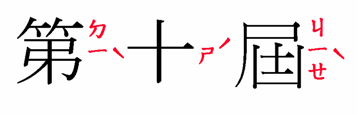
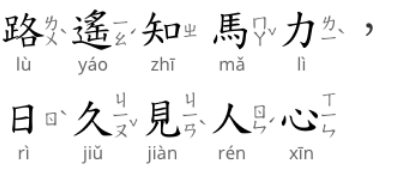
Bopomofo, or zhuyin fuhao, characters used in ruby with Traditional Chinese characters are marked up in exactly the same way as mono ruby. No special markup is needed. However, unlike Japanese or Chinese pinyin annotations, the ruby text is normally displayed vertically alongside each base character, with most tone marks carefully placed to the right of the bopomofo annotations.
You cannot expect bopomofo ruby to be aligned by default to the right of the base character without applying the appropriate CSS property (ruby-position:inter-character). The markup merely establishes the relationships between the base characters and the ruby text. The positioning of the phonetic characters and tone marks to the right of the base character is achieved by styling. For example, the markup needed for the characters just above is as shown just below. We will add some CSS styling to this example, so that we stand the best chance of seeing what is expected, but at the time of writing, the inter-character value is not yet supported by browsers.
ruby { ruby-position: inter-character; }
<ruby><rb>第<rt>ㄉㄧˋ<rb>十<rt>ㄕˊ<rb>屆<rt>ㄐㄧㄝˋ</ruby>
Output in your browser:
第
Does it work? For all browsers, the association of base elements to annotation elements works fine. However, when the CSS is applied, only WebKit browsers make the annotation run vertically alongside the base character, but they don't move the tone marks to the right of the bopomofo, so the implementation falls short of providing a workable solution. Blink and Gecko browsers display the annotation above the base.
Gaps in the sequence
Occasionally you may want to mark up a sequence of base characters as a single ruby element when there is a non-kanji character in the middle of a word. Here is an example.
振り仮名
One way to do this would be to use an empty rt element after り.
You could do this using an interleaved approach with a blank rt element.
However, if you were to render the annotation inline, you'd have to ensure that your styling* removed anything that indicated the location of the missing character, so that you don't end up with 振(ふ)り()仮(が)名(な).
If you want the inlining to produce annotations grouped into words, you would use the tabular approach.
However, now the result would be missing a character. You would see 振り仮名(ふがな), instead of 振り仮名(ふりがな).
How to do it. A better alternative would be to repeat the character in both the base and ruby text, and rely on CSS or the browser's default style sheet to automatically hide the annotation when both base and ruby text are the same. See Ruby Styling for details.
Does it work? Gecko browsers support the automatic hiding of the annotation when it is identical to the base. Blink and WebKit browsers don't yet support this.
All browsers allow you to simulate this using an empty rt element, but that creates problems when the annotations are displayed inline or if the annotations are used for text-to-speech. That is therefore not a great solution.
How long should my ruby element be?
Given the ability to string multiple ruby pairings together in a single ruby element, the question arises as to what is the optimal number of pairings within any given ruby element.
You are free to decide this for yourself. If, however, you want to use a jukugo ruby arrangement some time in the future, you will need to establish clear word boundaries, so that annotations don't overlap adjacent words. This may also be important if you want to produce inline versions of your annotations, and you have used the tabular markup approach. That will ensure that the annotations appear after the words that they refer to. In these cases, you should start a new ruby element for each word.
Here is an example where compound nouns are annotated in separate ruby elements. (We use a dotted red line to show the boundaries between each compound noun.)
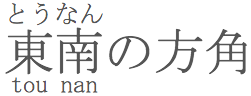
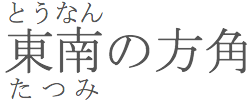
Occasionally it is necessary to run annotations along two sides of the base text. This would be the case where there is both a phonetic and a semantic annotation, or where there are two types of phonetic annotation (such as bopomofo and pinyin as shown in the top left of the following screen grab).
Note: In this article we are concerned with how to mark up the content. However, in order to display the two sets of ruby text on either side of the base text it is necessary to use the ruby-position property in CSS, since the HTML5 spec doesn't specify how to handle double-sided ruby by default. For more information, see the Ruby Styling article. By default, double-sided ruby is typically displayed as two annotations, one above the other, over the base text. In the examples below we will use CSS to move one of the annotations below the base.
Using mono ruby only
Let's look at a Japanese example where there is a regular one-to-one correspondence between the base characters and their two items of associated ruby text.
How to do it. One approach to coding this would be to use tabular markup, but with an rtc element around the second set of rts. You can visualize this as adding an additional row to the table, and the rtc element shows where that starts.
[ruby]
[rb][rb][rb]
[rt][rt][rt]
[rt][rt][rt]  <-- rtc around this
[ruby]
Here is the actual code. Note that you have to add an end tag for the rt element before the end rtc tag.
An alternative is to nest the ruby elements. This would yield code like the following. Some CSS styling is needed to move one annotation below the base.
Does it work? Although the tabular arrangement of elements is the most appropriate approach for double-sided ruby support, we already know that it is not yet supported by Blink and WebKit browsers. Gecko browsers, though, do support this approach.
Nesting ruby elements is supported by all major browsers, although this can be complicated to create, and suffers from the same problems we have seen related to flattening of the annotations.
Using mono and group ruby together
When using double-sided ruby in Japanese you are probably more likely to need to combine mono ruby phonetics with group ruby semantics for a given word. This is also possible. Here is an example.
How to do it. When using the tabular approach, you just put the group ruby text into a single rtc element that spans the two base characters.
Does it work? Again, the tabular arrangement of elements is the most appropriate approach for double-sided ruby support, but it is not yet supported by Blink and WebKit browsers. Gecko browsers, though, do support this approach.
Nesting ruby elements is supported by all major browsers although, as previously mentioned, this can be complicated to create, and suffers from the same problems we have seen related to flattening of the annotations.
Partially overlapping ruby
It has to be said that this is not very common, but in some cases the annotation on one side of the base characters maps to a different set of characters than the annotation on the other side. For instance, the following is a real life example.
How to do it. This is relatively straightforward when using the tabular approach, since it allows you to leave blank rt elements where needed.
(Actually, in this example you could omit the empty rt element altogether and it would still parse correctly. I have left it in so that the example shows the table-like structure more clearly.)
When nesting, you can also achieve the effect required for the example above, but if group ruby were supposed to be on the top you would have to use CSS to reverse the normal positions of the annotations so that you could make the markup work. If the two annotations started and ended at different places, this would be much more difficult to manage.
Does it work? As before, the tabular approach is currently supported only by Gecko browsers. This arrangement of annotations can be managed for this particular example by nesting ruby elements, but this doesn't lend itself well to other arrangements, such as where the two annotations start and end at different places.
Browser versions
The article describes behavior for the following browser versions. We will try to update the article as behavior changes.
 Blink
Blink Gecko
Gecko WebKit